
Animated LLM Landscape Presentation with Remotion
Request

Product Owner
PO
Use Remotion to create an animated presentation video with actual LLM comparison data — show the April 2026 landscape: which models lead on intelligence index and HLE benchmark, what developers actually say about each one, and render it as a proper MP4.

Developer
Cody
remotion · react · typescript · docker
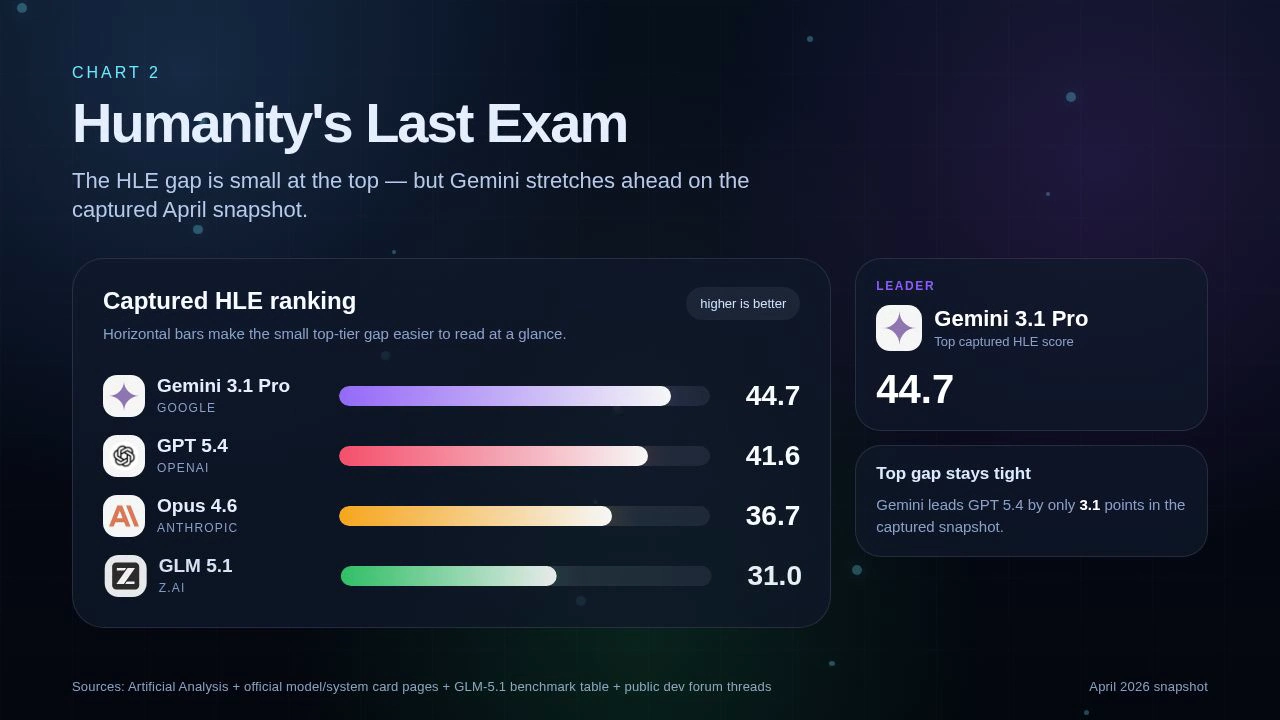
On it — I'll build a multi-scene Remotion composition in React/TypeScript: hero intro with orbiting model badges, animated intelligence index bars, HLE benchmark chart, a "no single winner" summary grid, and a developer opinions section with rotating opinion cards. Render via Docker to MP4.
What is Remotion?
Remotion lets you build videos in React. Instead of a timeline editor, you write TypeScript components — every frame is a pure function of the current frame number. You get spring animations, interpolation, and the full React ecosystem. The output is a real MP4 rendered headlessly via Chromium.
Why it’s great for data presentations:
- Data lives in code — no copy-pasting into Keynote
- Animations are deterministic and reproducible
- Easy to update: change a number, re-render
- Version-controllable like any other source file
Result
24 seconds · 1920×1080 · 30fps · 5 scenes
What We Asked the Agent to Do
The full video was built by giving the AI agent a few concrete instructions:
- Download model logos — find and fetch SVG/PNG icons for each LLM provider (OpenAI, Google, Anthropic, Z.ai, Moonshot AI) into the
public/logos/folder - Research and fill in the data — find current Intelligence Index and HLE benchmark scores for the April 2026 snapshot and write them into a structured text file for the component to consume
- Check stills and iterate — render individual frames as PNG stills, review the visual output, and fix layout or animation issues (bar alignment, opacity bleed, logo sizing) before doing the final full render
⚙️ Auto-generated from template — this project was scaffolded automatically using the Remotion skill template. The structure, render pipeline, and Docker setup were generated; only the data and scene content were customized.
Project Structure
remotion_render/
├── src/
│   ├── index.ts          # Composition registry
│   └── VibeCoding.tsx    # The full presentation component
├── public/
│   └── logos/            # Model logo SVGs/PNGs
├── render.sh             # Docker render script
└── out/
    └── llm-landscape-final.mp4
The Data
Five models tracked in the April 2026 snapshot, with Intelligence Index (Artificial Analysis) and HLE (Humanity’s Last Exam) scores:
| Model | Provider | Intelligence | HLE |
|---|---|---|---|
| GPT 5.4 | OpenAI | 57 | 41.6 |
| Gemini 3.1 Pro | 57 | 44.7 | |
| Opus 4.6 | Anthropic | 53 | 36.7 |
| GLM 5.1 | Z.ai | 51 | 31.0 |
| Kimi-K2 2.6 | Moonshot AI | — | — |
Kimi-K2 gets a separate momentum callout — it’s the new open-weights leader but exact matching numeric rows weren’t locked at capture time.
Step 1 — Get the Data
Ask the agent to research and collect the data you need — benchmark scores, model names, provider info — and write it into a structured file in the project. No manual copy-pasting.
Step 2 — Get Images & Reference Assets
Ask the agent to find and download logos, icons, or any reference images. It will search, fetch, and place them automatically.
Step 3 — Install Remotion & Docker
If you don’t have them yet:
- Docker Desktop — just install it, nothing to configure
- Remotion — the agent installs it automatically, no local setup needed
That’s it. The template handles everything else.
Step 4 — Render
Just ask the agent to render. It runs Docker, spins up a container with Chromium and Remotion inside, and outputs the final MP4 — no commands to write yourself.
🐳 Requirement: Docker Desktop — just install it. No GPU, no tuning, no local Node setup needed.
Step 5 — Check Stills, Fix & Re-render
Before doing the full render, ask the agent to render individual frames as PNG stills. Review them, tell the agent what looks off — layout, colors, text, timing — and it will fix and re-render stills until you’re happy. Then do the final full MP4 render.
Key Learnings
- Remotion can do cool animations — React components +
spring()+ frame math is enough to build cinematic multi-scene presentations with zero video editing - The agent can find and combine data itself — no manual research needed; it searched for benchmark scores, structured them, and wired them into the component
- Images can also be downloaded automatically — the agent fetched all model logos on its own, no manual asset hunting required